MX records (the “MX” stands for Mail Exchange) are entries in your domain’s DNS settings that tell the internet which mail server should receive email for your domain. When someone sends a message to you@yourcompany.in, their mail server looks up your MX records to find where to deliver it. No MX records, or MX records pointing to the wrong server, means email either bounces back to the sender or lands somewhere you cannot access.
If you have ever received an email from your domain provider saying “update your MX records” or “configure DNS for email,” this is what they are talking about. The term sounds technical, but the concept is straightforward once you have a working analogy. That is what this guide covers. For a broader look at whether branded email is worth setting up in the first place, see our guide to what business email actually is and whether you need it.
What MX Records Do for Your Email
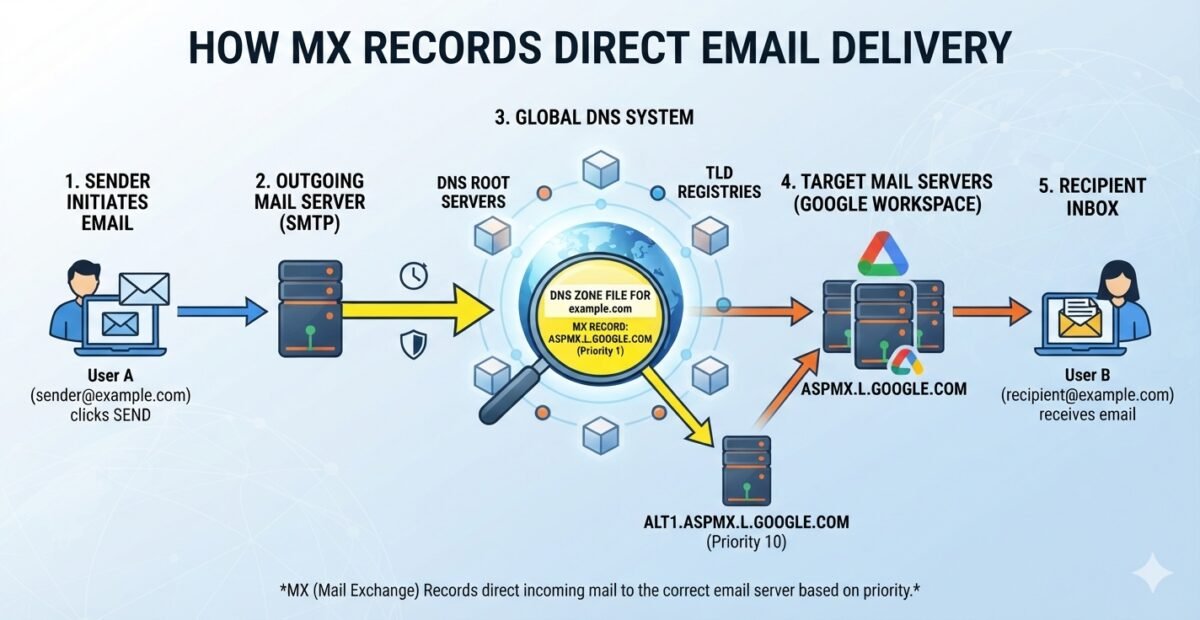
Every time someone sends an email to an email address on your domain, the sending mail server needs to figure out where to deliver that message. It does this by querying DNS, the global directory system that translates domain names into server addresses. Among the various DNS records for your domain, the MX record specifically answers one question: which server handles incoming mail for this domain?
Without an MX record, the sending server has no instructions. It does not know where to send the message, so the email bounces. With an MX record that points to the wrong server, the email gets delivered somewhere, just not to your inbox. You might never see it.
Here is the part that confuses most people: your email address and your MX records are two different things. Your email address (priya@yourcompany.com) is what people type when they send you a message. Your MX records are what the internet reads to figure out where that message should physically arrive. You can change your MX records without changing a single email address, and that is exactly what happens when you switch from one email provider to another.
An MX record has two parts: a priority number and a mail server hostname. The priority number tells sending servers which mail server to try first. Lower numbers mean higher priority. If the first-choice server is unavailable, the sending server falls back to the next one based on priority order. Most providers give you one or two MX records, but some use up to five for redundancy.
The Postal Address Example
Think of your domain name as a commercial building address. Your visiting card says “Shop 14, Lakshmi Nagar, Delhi.” That address is what clients and suppliers know. It does not change.
Now, when a courier arrives at the complex gate with a package for Shop 14, the security guard checks the building directory to find which floor and room the courier should deliver to. That directory entry is your MX record. It tells the delivery person exactly where inside the building the mail should go.
Imagine you move your shop from the ground floor to the third floor within the same complex. The address on your visiting card stays the same. Clients keep sending packages to “Shop 14, Lakshmi Nagar, Delhi.” But if you do not update the building directory, couriers will still go to the ground floor and find nobody there. Your packages get returned to the sender.
That is exactly what happens when you switch email providers but forget to update your MX records. Clients send email to the same address they always have, but the messages go to the old server, which no longer has your inbox. The emails bounce, and the client thinks you are ignoring them. The fix is simple in concept: update the building directory (your MX records) to point to the new floor (your new mail provider’s servers). The address on your visiting card does not change, and clients notice nothing different. Behind the scenes, mail is now routed to the right place.
This is also why two businesses can have identical email formats, say firstname@companyname.in, but receive their mail on completely different platforms. The domain name is the address. The MX record is the internal routing instruction. Same building, different mailrooms.
Google Workspace, Titan Email or Rediffmail Enterprise MX Records
When you choose an email provider, the practical change at the DNS level is this: you replace your old MX records with the ones your new provider gives you. Your email addresses stay the same. Your domain stays the same. What changes is which server receives the mail on your domain’s behalf.
Here is how the three providers we offer compare at the DNS level and in what they deliver to your business. For a deeper comparison of what you get for the price, see our breakdown of free Gmail vs Google Workspace and what you actually pay for.
| Provider | MX Record Points To |
|---|---|
| Titan Email | mx1.titan.email (priority 10), mx2.titan.email (priority 20) |
| Rediffmail Enterprise | mail.rediffmailpro.com (priority 10) |
| Google Workspace | smtp.google.com (priority 1) |
Titan Email: Two Records, Mail Only
Titan uses two MX records: mx1.titan.email at priority 10 and mx2.titan.email at priority 20. The second record is a backup. If the primary server is temporarily unavailable, the sending server tries the second one. At ₹720/user/year, Titan Email is the most affordable branded email option we offer. It gives you a clean inbox on your own domain with simple productivity tools and ample storage options such as 5GB, 10GB and 50GB.
Titan works well for a team that lives in email and does not need video meeting, cloud storage, or document collaboration.
Rediffmail Enterprise: One Record, India-Based Infrastructure
Rediffmail Enterprise uses a single MX record pointing to mail.rediffmailpro.com at priority 10. At ₹1,080/user/year, it sits between Titan Email and Google Workspace in price and adds few things Titan Email does not:
- Data localisation on Indian servers
- Storage sharing across organisation
- Custom-branded login page where your employees access webmail.
The data localisation point matters for businesses handling sensitive client information or working in regulated sectors where data residency is a concern.
Google Workspace: One Record, Full Ecosystem
Google Workspace now uses a single MX record pointing to smtp.google.com at priority 1 for new accounts. (Older accounts may still use five MX records pointing to ASPMX.L.GOOGLE.COM and its backup servers, but both configurations work fine.) At ₹2,400/user/year, this is the most expensive option we offer, and the reason is simple: you are not just buying email. You are buying Gmail, Google Drive, Google Meet, and Google Docs together, plus an admin console where you manage users, security policies, and device access.
For a team that already relies on Google tools for collaboration, pointing MX records at Google means your email, files, and video calls all live in one ecosystem. The MX record change is the technical step that makes your domain’s mail arrive in Gmail instead of wherever it was going before.
Regardless of which provider you choose, the concept is the same: you are updating the delivery instructions for your business email setup.
The email addresses do not change. The people sending you email do not need to do anything differently. What changes is the server that receives and stores the mail on the other end. If you are also setting up new mailboxes for the first time, our guide to professional email address formats for Indian teams walks through naming conventions before you create accounts.
Why You Probably Shouldn’t Edit DNS Yourself
The DNS settings panel at your domain registrar is not a place for experimentation. A single typo in an MX record value, a missing dot at the end of a hostname, or an extra space can quietly break all incoming email for your domain. And because DNS changes take time to propagate, you might not notice the problem for hours, by which time clients have already sent messages that bounced or landed on a dead server.
Here are the specific mistakes we see most often when business owners try to handle DNS changes on their own:
- Adding new MX records without removing the old ones. This causes email to split between two servers unpredictably. Some messages arrive in the new inbox, others go to the old one, and you have no idea which is where.
- Typing the mail server hostname incorrectly. One character off, and the entire domain stops receiving email. DNS does not autocorrect or suggest alternatives.
- Setting the wrong priority values. If the backup server has a lower priority number than the primary, mail tries the backup first and the primary second, which is the opposite of what you want.
- Changing the wrong record type. DNS panels show many record types (A, CNAME, TXT, MX) in the same view. Editing an A record when you meant to edit an MX record can take your website offline while your email keeps working, or vice versa.
- Not waiting for propagation. DNS changes can take anywhere from a few minutes to 48 hours to take effect globally. Panicking and making additional changes mid-propagation creates a mess that takes longer to untangle.
None of this is meant to scare you. The DNS panel is a perfectly safe place for someone who knows what they are doing. But if your domain provider sent you an email about MX records and your first reaction was “I do not know what this means,” that is a clear signal to have someone who does know handle it. The cost of getting it wrong is not just a few bounced emails. It is lost client communication at exactly the moment you cannot afford to miss it.
This is why we handle DNS, MX records, and the full setup as part of every email plan we sell. You do not need to log into your domain registrar, find the DNS panel, or figure out what priority values to enter. We do that work and verify it is correct before we consider the setup complete.
Let Someone Else Handle the Configuration
If you have read this far, you now understand what MX records do: they tell the internet where to deliver email for your domain. You understand that switching providers means updating those records, not changing your email address. And you understand that the DNS panel is not the place to learn by trial and error when your business email is on the line.
That conceptual understanding is all you need to have an informed conversation with whoever manages your email. You do not need to know the exact hostname or priority value. You need to know what the change does, why it matters, and what can go wrong if it is handled carelessly. That is the difference between nodding along when a vendor uses jargon and asking the right questions.
If you are ready to set up branded email for your team, or if you are switching providers and want the DNS handled correctly the first time, get in touch with us. From helping you choose the right email solution to domain setup and ongoing technical and admin support – we handle everything.
No pressure, no jargon, just a straightforward conversation about what your business actually needs.
Frequently Asked Questions
What happens if I delete my MX records by mistake?
All incoming email to your domain will stop arriving. Messages will either bounce back to the sender or queue on their server until delivery times out. If this happens, restore the correct MX records as soon as possible and ask anyone who emailed you during the gap to resend. Most providers have the exact MX values listed in their setup guides.
Can I have MX records pointing to two different email providers at the same time?
Technically yes, but it causes unpredictable delivery. Mail servers use priority values to decide where to send messages, and if two providers have similar priorities, some emails will land on one server and some on the other. If you are migrating between providers, finish the switch and remove the old MX records rather than running both in parallel.
How long does it take for MX record changes to take effect?
DNS changes can take anywhere from a few minutes to 48 hours to propagate across the internet. In practice, most changes take effect within a few hours. During this window, some email may still route to the old server. This is normal and is why we recommend keeping the old inbox accessible during a migration.
Do MX records affect outgoing email?
No. MX records only control where incoming email is delivered. Outgoing email delivery depends on other DNS records like SPF, DKIM, and DMARC, which authenticate your messages and help them reach the recipient’s inbox rather than the spam folder.
Will changing MX records affect my website?
No. MX records only affect email routing. Your website’s accessibility is controlled by A records and CNAME records, which are separate DNS entries. Changing MX records will not take your website offline or affect how it loads.